
Getting Started
Special
SINGLE SIGN-ON
Teams
Users
Escalation Policies
Service
Incident
Request
On-Call Shift
Schedules
Schedule Override
Logs
API
Webhook
Apps Integration
Reports
Preference
Profile
Automation
Self-Service Portal
Mobile App
SLA
FAQ
Quick start guide
Get started with your new Callgoose SQIBS account.This guide will help you get started with your Callgoose account, from configuring your user profile to receiving your first incident notification.
Reseller
The following steps only demonstrate how you can receive your first incident notification for a RESELLER .
Step 1 : Create a RESELLER account
First, you need to create a Callgoose account. For the guidance tap here
Step 2 : Configure SQIBS RESELLER Dashboard
- Open SQIBS Dashboard
You can open the SQIBS dashboard from the Home section of the main dashboard. (Created in Step 1)
Select the GO TO DASHBOARD button. - Add Global Admin
From the Users tab, you can add Global admins by entering their email addresses and name. An invitation link will send to the email, which further enables verification of the email and the user can complete their registration.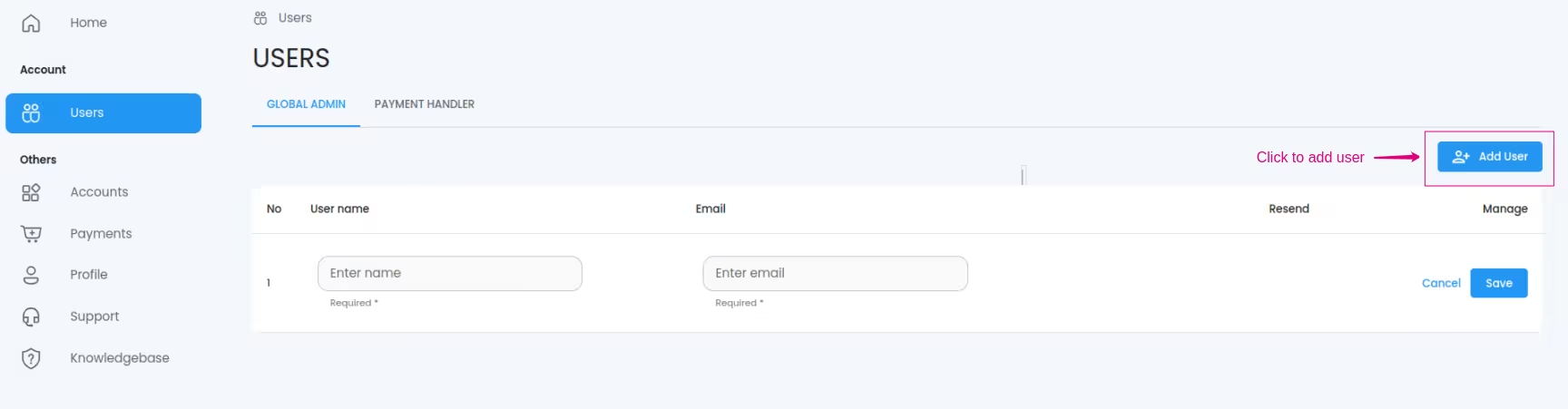
Step 3 : Global Admin Login and setup
SQIBS Login Navigate to our SQIBS Login Page and login with the credentials.
Notification Rule. Setup a Notification Rule. click here
Team Create Team click here.
Escalation Create Escalation click here .
Service Create Service click here .
Incident Create Incident click here .
Congrats! You created your first incident. You will get notified as per the Escalation and the Notification rule you defined.
User
The following steps only demonstrate how you can receive your first incident notification for a USER .
Prerequisite
Here we expecting that Team , Escalation policy and Services are created by a Global admin earlier.
Here we expecting that Team , Escalation policy and Services are created by a Global admin earlier.
Step 1 : User Login and setup
SQIBS Login Navigate to our SQIBS Login Page and login with the credentials.
Notification Rule. Setup a Notification Rule. click here
Incident Create Incident click here .
You will get notified as per the Escalation and the Notification rule you defined.
